- webPatrol
- webPatrol - Access system
# webPatrol - Access system
# About webPatrol
The webPatrol module is used for registration and configuration of access and attendance readers, setting and registration of cards, fingerprints, records of faces and hands of employees, registration of transactions, control of reader actions and monitoring of the actual presence of persons in defined areas.
# The most used icons in webPatrol
| Icon | Purpose |
|---|---|
 |
Osend/save the edited record to the server |
 |
Loading from the reader |
 |
Notice that the field must be filled. |
 |
Note that the field (if filled) must contain a unique name |
 |
Creating a new reader/user/template record |
 |
Print the currently visible table |
 |
Deletes selected records |
 |
Synchronize user/user templates between the server and all visible readers |
 |
Synchronize user templates from the server to the selected ones readers.  |
 |
Synchronize user templates that have been modified and do not match the templates in the reader.  |
 |
It is used to update the firmware of the selected ones readers (do not use/contact software technician before use) |
 |
System module component designation |
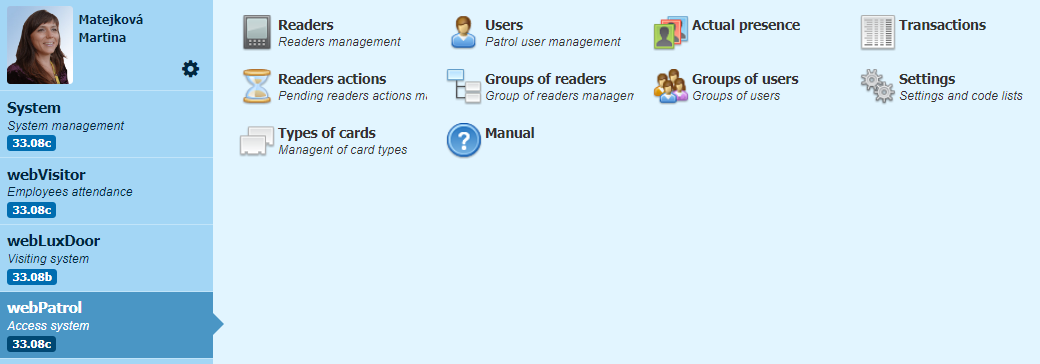
# WebPatrol code lists
| Dial name | Another name of the code list | Use of the code list |
|---|---|---|
| Readers | Reader Management | Reader records, synchronization of user templates and synchronization of reader settings server->reader, as well as reader->server, reader software update***1**. |
| Users | Patrol user management | Record of user templates, synchronization of user templates server->reader, copying between types of templates. |
| Actual presence | --- | Overview of where the user is currently located***2**. |
| Transactions | --- | Overview of all transactions, includes verified, unverified, status and many more. |
| Reader actions | Manage pending reader actions | Overview of reader actions, includes actions ready to be sent to the reader , selected for processing, which jobs are being processed, processed***3**, processed with error. |
| Groups of readers | Manage reader groups | It serves to filter a larger number of readers in Readers - filtering. |
| Groups of users | Groups of users | It is intended for the setting of automatic assignment of multiple readers to users. |
| Settings | Settings and code lists | Common webPatrol module settings, User rights in webPatrol, Time zones, Keys and readers management, etc. |
| Types of cards | Manage card types | Adjustable formatting of different types of cards and automatic adjustment of the loaded internal card numbers***4**. |
Note
*1. The reader software update can only be used after agreement and correct settings
*2. Only if the areas are correctly set and the readers assigned to them
*3. Information about the processed readers actions is continuously deleted.
*4. Set up by a software engineer.