- webPatrol
- Transactions
# Transactions
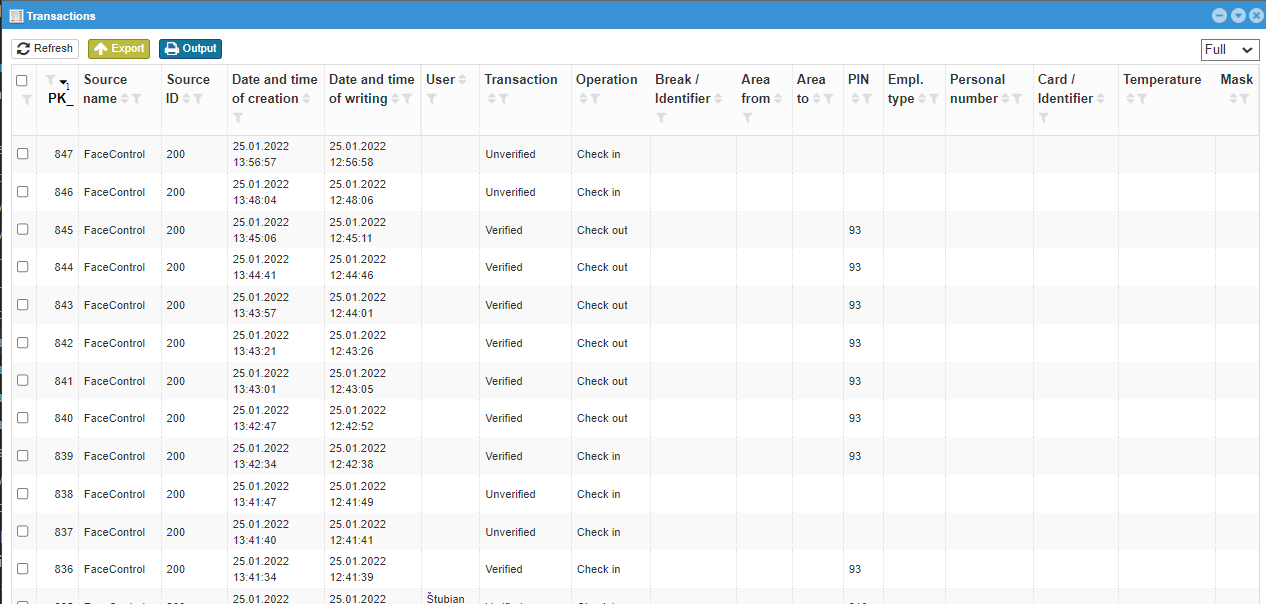
It is used to view completed transactions. Which includes unverified transactions and informational transactions such as Alarm.
 |
|---|
# Full vs Basic
| Column name | Full | Basic | Filter | Explanation |
|---|---|---|---|---|
| PK_ | ☑ | ☑ | Fill in | Transaction number |
| Source name | ☑ | ☑ | Fill in | The reader name in which the transaction was created |
| Source ID | ☑ | ☑ | Fill in | The reader number in which the transaction was created |
| Date and time of creation | ☑ | ☑ | Fill in the whole | Date and time in which the transaction occurred |
| Date and time of writing | ☑ | ☒ | Fill in the whole | The date and time the transaction was received on the server |
| User | ☑ | ☑ | Choose from options | User name |
| Transaction | ☑ | ☑ | Choose from options | Transaction type |
| Operation | ☑ | ☑ | Choose from options | Type of operation |
| Break / Identifier | ☑ | ☑ | Choose from options | Break number and name, if specified |
| Area from | ☑ | ☒ | Choose from options | The area from which the user passed the reader |
| Area to | ☑ | ☒ | Choose from options | The area into which the user passed the reader |
| PIN | ☑ | ☑ | Fill in | User number in webPatrol |
| Employment type | ☑ | ☑ | Choose from options |  Type of employment of the employee Type of employment of the employee |
| Personal number | ☑ | ☑ | Fill in | Personal number of the employee in the system |
| Card / Identifier | ☑ | ☑ | Fill in | Card / identifier number |
| Temperature | ☑ | ☒ | Fill in | Value |
| Mask | ☑ | ☒ | Choose from options | The verified person was / was not wearing a mask |
# Filter - choose from options
-
User- is selected according to users registered in webPatrol -
Break / Identifier- is selected according to the settings Breaks -
Area fromandArea to- is selected according to the settings Areas -
Employment type- is selected from Types of employment -
Mask- He had / He didn't
Warning
At the bottom of the window, it is possible to set how many results can be seen in one window, I do not recommend using the All option in this case, as the number of transactions can be in the tens of thousands. In such a case, it may happen that not all of them can be loaded and it will only take you a long time to wait for the result.
# Transaction
Many options from the transaction type are minimally used, or a reader must be set to use them.
A selection of filters for transactions includes (the most important/most used have a higher priority in the order):
-
Unverified - card- osoba sa snažila overiť kartou, no táto karta nie je zapísaná medzi vzorkami v snímači -
Unverified- osoba sa snažila overiť, ale nebola rozpoznaná -
Verified but access denied - other reasons -
Verified- užívateľ bol overený -
Unknown -
Verified but access denied - time zone- užívateľ bol overený, no podľa jeho oprávnení v tejto časovej zóne nemá prístup -
Verified - Passing out- verified on clock out from areas -
Overený - Passing in- verified upon clock in into one of areas -
NUnknown transaction -
Turning on the reader -
Turning off the reader -
Authentication failed -
Alarm -
Entering the menu -
Changing settings -
Template backup -
Password added -
Registered HID card -
Deleting a user -
Deleting a template -
Deleting of password -
Deleting the RF card -
Deleted data -
Created MF card -
Entered MF card -
Registered MF card -
Deleting the MF card -
Deleting the contents of the MF card -
Copying data to the card -
Copying data from the card to the reader -
Setting the date and time -
Restoring factory settings of the reader -
Deleting the attendance record -
Deleting administrator rights -
Checking access settings -
Checking of user access settings -
Checking of time zone -
Checking of unlock -
Unlocking the reader -
Adding a user -
Changing the parameters of the print -
Pressure alarm -
Identity not confirmed -
Anti-pass back -
Creation of an attendance record -
Fingerprint verification -
Adding a user -
Creating a template -
Pressing the button -
Unlocking the reader -
System startup -
Verification -
Generating a template from a print -
Alarm -
RF card number -
Card write-up OK -
Removing the card OK -
EMData -
Connection -
Disconnection -
Doors -
Deleting a template -
Attendance transaction -
Creating a template -
Alarm - False alarm -
Alarm - Door reader -
Alarm - Button -
Alarm - Tamper -
Alarm - switched off -
Pressure alarm - Button -
Pressure alarm - Verification error -
Verification error - Password -
Verification error - Finger -
Verification error - ID card -
Verification error - PIN -
Verification error - Mifare card -
Verification error - iClass card -
Door - Door open for a long time! -
Door - Opening with an electric lock -
Door - Door is closed -
Door - Door was forced open - And many others
# Operation
The transaction may talk about verification, but at the same time it sends the information needed to webVisitor or webApetit, so there are still operations.
-
- -
Clock in -
Clock out -
Order food -
Cancel food -
Food into bourse -
Select food from bourse -
Dispense of food -
Food - verified -
Clock in from lunch -
Change of company -
Change of employment type -
Patrol -
Clock out for lunch -
Clock in from break -
Clock out for break -
Balance -
Start of task -
End of task